

- Gulp.js is a build system for application development.
- Gulp.js uses JavaScript programming language to create the application specific build system.
- In this demo,”We will learn to setup Gulp and create a simple build to generate a minified version of script file”.
- The Gulp can be installed using npm install gulp –save-dev command in a terminal.The following screenshot shows a terminal with Gulp installation is in progress.

- For demonstration purpose we have created my-script.js file.It has a single method addTwoNumber() method for addition of 2 numbers.The content of my-script.js file is as below.
var addTwoNumber = function(number1,number2){
    return number1+number2;
};
var result = addTwoNumber(5,6);
console.log("result: ",result);
- We can also use package.json file and include it by using npm init command.The following screenshot shows the npm initialization in terminal.

- Now we need to install uglify module in the system.The command to install uglify using npm install –save-dev gulf-uglify in terminal.The following screenshot shows the terminal with uglify module in installation.
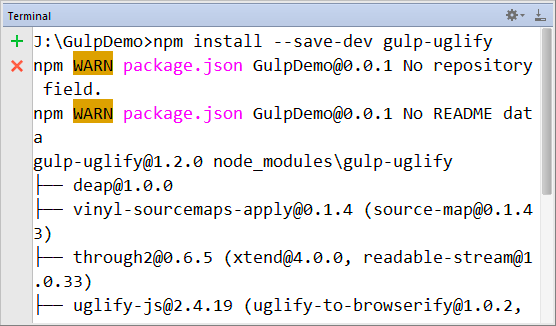
- After installation of uglify the package.json file is updated and looks like following code.
{
  "name": "GulpDemo",
  "version": "0.0.1",
  "description": "Gulp Demo",
  "author": "Sandeep",
  "license": "ISC",
  "devDependencies": {
    "gulp": "^3.8.11",
    "gulp-uglify": "^1.2.0"
  }
}
- Now it is time for develop a Gulp build system.All the code for the custom build using Gulp can be written in Gulpfile.js file.The content of Gulpfile.js is as follows.
var gulp   = require('gulp');
var uglify = require('gulp-uglify');

gulp.task('uglify', function() {
    gulp.src('dev/my-script.js')
        .pipe(uglify({}))
        .pipe(gulp.dest('dist'));
});
    gulp.task('default',['uglify']);

gulp.task('watch', function() {
    gulp.watch('dev/*.js', ['default']);
});
- Now we can run gulp command in a terminal to uglify the my-script.js file.The following screenshot shows the terminal with gulp command.

- The output will be found in the side the dist directory in a newly created my-script.js file.The following code shows the minified version in dist/my-script.js file.
var addTwoNumber=function(r,e){return r+e},result=addTwoNumber(5,6);console.log("result: ",result);
- The updated project structure will look like following screenshot.
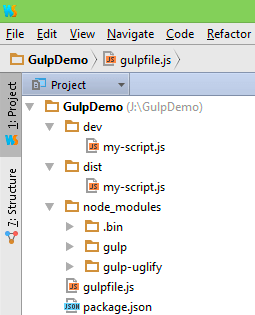
- We have crated a watcher also which run the default task if any changes found in the dev/my-script.js file.

- The demo code can be downloaded from the following link.
https://github.com/saan1984/GulpDemo
