ReactJS
- ReactJS provide support to maintains states.
- It means a component can have multiple states during its life cycle.
- React provide properties and API methods to work with states of a component.
- In this demo, “We will develop an example which change its state by user interaction/inputs”.
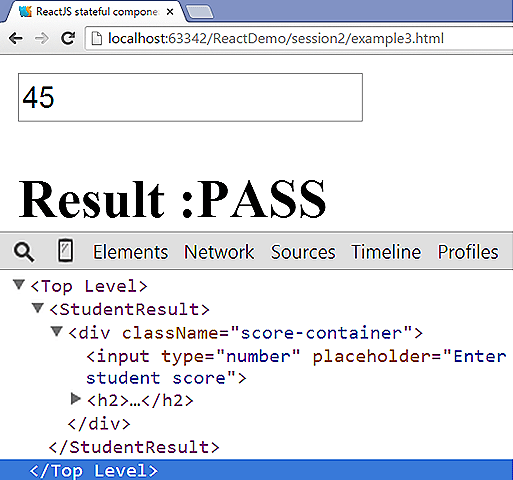
- The following code creates a ReactJS component which has input element which takes student scores as number.If the score is greater then equal to 30 student is PASS or else student is FAIL.
- To access list of state we can use this.sates property.
- To change the value of a state we can use this.setState(object) method.The object is a key-value pair where key is the name of state and value is the changed state name.
- The code for this demo is listed as follows:-
<!DOCTYPE html>
<html>
<head lang="en">
    <meta charset="UTF-8">
    <title>ReactJS stateful component Demo</title>
    <script src="https://fb.me/react-0.13.3.min.js"></script>
    <script src="https://fb.me/JSXTransformer-0.13.3.js"></script>
</head>
<body>
<script type="text/jsx">
    var StudentResult = React.createClass({
        getInitialState: function(){
            return{
                result:" "
            };
        },
        calculateResult: function(){
            var refScore = this.refs.studentScore.getDOMNode().value,
                    score = parseInt(refScore,10);
            if(score >= 30){
                this.setState({result:"PASS"})
            }else if(score < 30){
                this.setState({result:"FAIL"})
            }else{
                this.setState({result:""})
            }
        },
        render: function() {
            return (
                    <div className="score-container">
                        <input type="number" ref="studentScore"
                               onChange={this.calculateResult}
                               placeholder="Enter student score"/>
                        <h2>Result :{this.state.result}</h2>
                    </div>
            );
        }
    });
    React.render(<StudentResult/>, document.body);
</script>
</body>
</html>
- The output of the code can be viewed in JSBIN link.
ReactJS stateful component Demo on jsbin.com
- The output looks like following screenshot.