

- The ES2015 symbol is a immutable data type like Strings.
- The Symbols are unique, unlike string type.
- In this demo, “We will learn to use ES6 Symbol through coded example”.
- For this demo we have create ES6BabelDemo project and looks like following screenshot:-

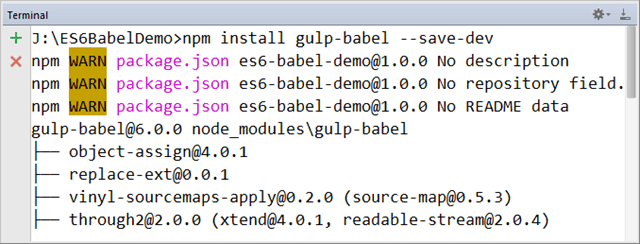
- The gulp-babel can be installed using npm install gulp-babel command.The following screenshot shows the gulp-babel installation.
- The babel-preset-es2015 can be installed using npm install babel-preset-es2015 –save-dev command.The following screenshot shows the terminal with preset installation.

- The gulpfile.js contains the code for defining tasks that will transpile the futuristic JS code to currently supported code.The code content of gulpfile.js are as follows:-
var gulp = require('gulp'),
    babel = require('gulp-babel');
gulp.task('babel', function () {
    return gulp.src('src/**/*.js')
        .pipe(babel({presets: ['es2015']}))
        .pipe(gulp.dest('dist'));
});
gulp.task('babel:watch', function () {
    return gulp.watch('src/**/*.js',['babel'])
});
gulp.task('default',['babel','babel:watch'] );
- The Symbol.for() method looks for the Global Symbol registry for given value and returns the matched symbol.If the symbol was not found it creates and returns a new Symbol.
- The Symbol.keyFor() method retrieves a Symbol for the given key.
- The src/example,js file contains the code for this demo.The content of src/example.js are as follows:-
var  symbol1 = Symbol("I am Symbol1");
console.log("symbol1: ",symbol1);
var symbol1Type = typeof symbol1;
console.log("symbol1Type: ",symbol1Type);

var  symbol2 = Symbol.for(24);
console.log("Key for symbol2: ",Symbol.keyFor(symbol2));
console.log("Symbol for key 24: ",Symbol.for(24));
"use strict";

function _typeof(obj) {
    return obj && typeof Symbol !== "undefined" && obj.constructor ===
        Symbol ? "symbol" : typeof obj;
}

var symbol1 = Symbol("I am Symbol1");
console.log("symbol1: ", symbol1);
var symbol1Type = typeof symbol1 === "undefined" ? "undefined" :
    _typeof(symbol1);
console.log("symbol1Type: ", symbol1Type);

var symbol2 = Symbol.for(24);
console.log("Key for symbol2: ", Symbol.keyFor(symbol2));
console.log("Symbol for key 24: ", Symbol.for(24));
- Gulp task can be executed using Gulp command.The following screenshot shows the terminal with Gulp in execution:-

- The output of this demo looks like following screenshot:-

- The demo code can be downloaded from the following link:-
https://github.com/saan1984/ES6BabelDemo
